
You can find the app RZL Connector in the Booking Experts' App Store:

If you click on Install, you will be redirected to a registration mask. If you installed the app before, you can start it from Booking Experts's app store with the Push Button "Start RZL Connector".
Registration mask will be displayed only on the first login. After clicking on the button "Register" you will see the main page for the creating the RZL import files. Before you can create the files, you must configure some settings.
In menu "RZL Config" you have to define the invoice prefix for each administration, that should be generated RZL import file for.

You can find the "Invoice prefix" in BEX->Administration Settings->Invoices in the field "Prefix for invoice identification number".
In menu "Account Mapping Config" you must assign the RZL accounts to the BEX accounts.

You can use Filter "Only used accounts" to see BEX accounts, that were booked in the last month. Only to these accounts must be assigned the RZL accounts.
After assigning RZL accounts, you can create the RZL import files. You can select a desired period of the creation of the bookings:
- monthly
- daily
- or custom period
You start the creation process with the click on the push button "Convert".
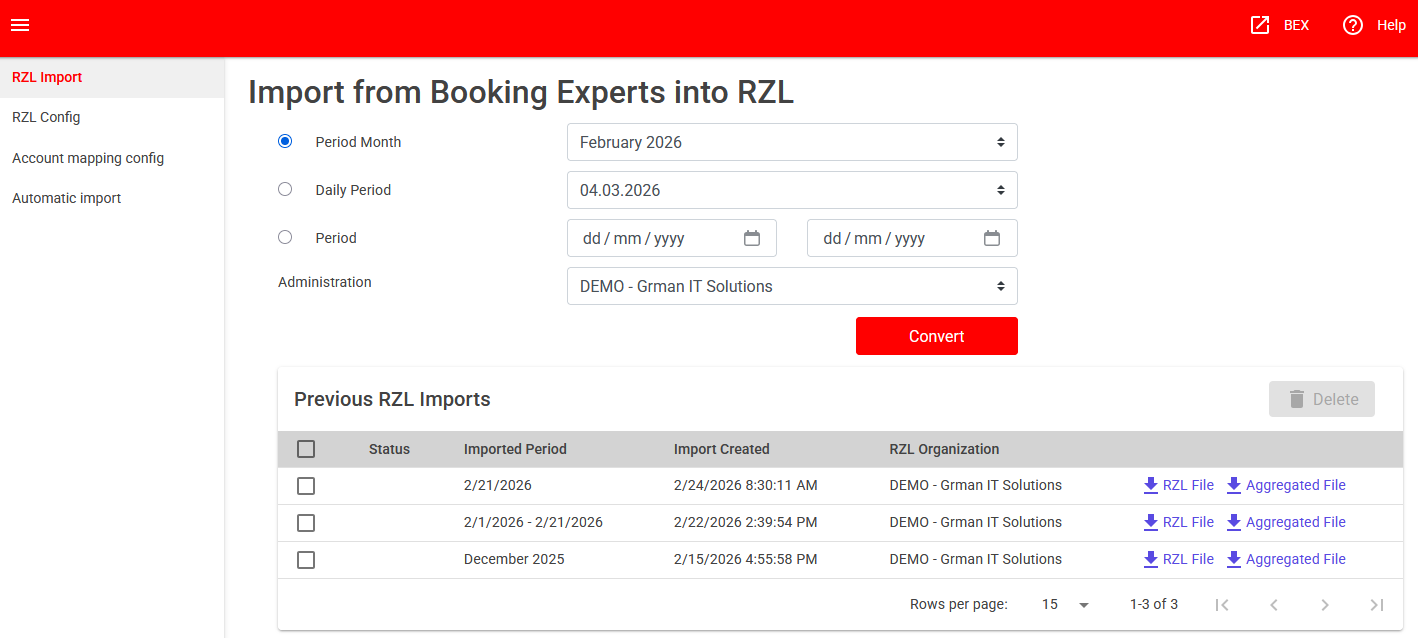
You can see the created import files in the list "Previous RZL Imports". If you click on the link "RZL File", the created file will be downloaded via Browser.
The "Aggregated Files" contains the summed booking per day, vat percent and accounts.